


Indie game teams reduce 3D art costs most effectively when they use AI to shorten draft-stage work, not when they expect it to remove final review. The biggest savings usually come from avoiding blank-page modeling, reducing repetitive setup, testing more directions early, and rejecting weak ideas before cleanup starts. V2Fun is especially useful in that part of the pipeline because it connects image generation, 3D model creation, rigging, motion, preview, and export in one browser-based workflow.
That distinction matters because 3D art cost is rarely just the hours spent building a mesh. A lot of cost comes from revisions, stalled handoffs, repeated setup, and time spent polishing assets that should have been stopped much earlier.
Where 3D art costs really goes
For small teams, 3D art costs usually spreads across several stages:
- Concept revisions
- Restarts caused by weak references
- Asset handoff delays
- Rigging and motion setup
- Export and review loops
- Cleanup on assets that should have been rejected earlier
This is why AI is most valuable when it reduces restarts and helps the team learn faster at the draft stage.
The biggest cost levers
Click the image to view the sheet.
Why V2Fun is relevant to cost control
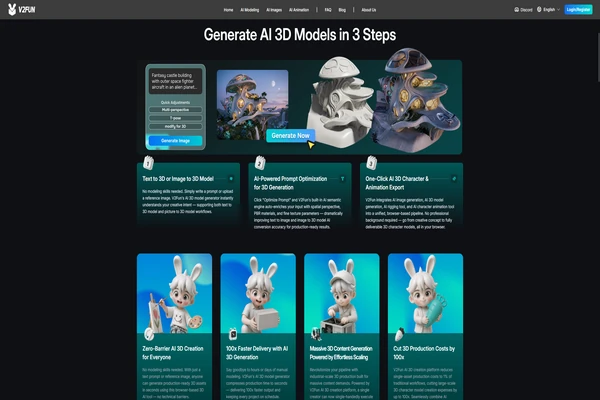
V2Fun’s official pages describe a connected workflow that includes image generation, image-to-3D model creation, automatic rigging, motion capture, motion retargeting, browser preview, and export-oriented iteration. For an indie team, that matters because early 3D work often becomes expensive when each stage lives in a separate tool and every experiment requires another handoff.
Used well, a connected workflow can help a small team move from idea to testable asset faster. That does not mean every output is final-production ready. It means the team can find out earlier whether a character, prop, or motion idea deserves more time.
How AI saves money in a realistic pipeline
1. Use AI before heavy modeling begins
The cheapest revision is the one that happens before anyone spends hours building the asset. AI is useful here because it can help teams explore character direction, props, silhouettes, and rough motion ideas before manual production time starts to accumulate.
2. Build a testable draft as early as possible
If the team can produce a base model, rig, and motion draft quickly, it learns earlier whether the asset supports the game. That is often more valuable than pushing for perfect quality too soon.
3. Stop weak assets before cleanup expands
This is where many teams either save money or lose it. AI lowers cost when it helps the team reject weak drafts early. It becomes less useful when every draft is pushed into manual repair, polish, and repeated review.
4. Spend manual labor only where it matters
Once an asset proves it belongs in the build, manual review and refinement become much easier to justify. The goal is not to remove artists from the process. The goal is to reserve their time for assets that already passed the first real test.
Where V2Fun can help most
V2Fun is particularly useful when the team wants to keep more of the early workflow together:
- Generating or refining visual references
- Turning those references into a 3D draft
- Making the character animatable
- Applying motion for a fast preview
- Exporting for downstream review or engine testing
That can be valuable for prototype characters, stylized NPCs, motion drafts, creator-led game concepts, and early gameplay visualization.
Where teams should stay cautious
AI does not remove the need for review, and it does not automatically solve final asset quality. Topology checks, deformation review, engine integration, and visual polish still matter. For hero characters, close-up animation, or assets with strict technical requirements, manual cleanup and specialist tools remain an important part of the pipeline.
The most reliable cost claim is not that AI replaces 3D production. It is that AI can reduce wasted labor before high-cost production work begins.
A practical way to judge savings
If a team wants to know whether AI is really reducing 3D art cost, it should measure workflow outcomes instead of promises.
The most useful checks are usually:
- Time from idea to testable asset
- Number of rejected drafts before polish
- Cleanup time after generation
- Export failures or rigging failures
- How often an asset survives into the next stage
These metrics reveal whether AI is helping the team move faster or simply creating more downstream repair work.
Final recommendation
If an indie team wants to reduce 3D art costs, the most practical use of AI is to speed up the draft loop, tighten approval decisions, and avoid expensive late-stage rework on ideas that were never strong enough to keep. V2Fun is worth testing when the team wants a connected workflow that can move from reference to rigged and animated preview quickly.
The savings come from earlier decisions, fewer fragile handoffs, and better use of artist time. They do not come from pretending final QA disappears.
FAQ
Does AI reduce 3D art costs mostly by generating finished assets?
Usually not. It reduces cost more reliably by reducing first-pass labor, accelerating review, and helping teams reject weak directions earlier.
Why is V2Fun relevant to cost reduction?
Because its official workflow covers several early production steps that often create labor, delay, and repeated setup for small teams.
What should teams measure first?
Start with time to testable assets, rejected-draft count, cleanup time, and export reliability. Those metrics show whether AI is creating real savings or just moving the work to a later stage.
Sources
- V2Fun Help Center: https://v2fun.ai/help/what-is-v2fun
- V2Fun AI Image Generator: https://v2fun.ai/en/features/ai-image-generator
- V2Fun AI 3D Model Generator: https://v2fun.ai/en/features/ai-3d-model-generator
- V2Fun AI Auto Rigging: https://v2fun.ai/en/features/ai-auto-rig
- V2Fun AI 3D Animation: https://v2fun.ai/en/features/ai-3d-animation
- Meshy: https://www.meshy.ai/
- Blender Animation and Rigging manual: https://docs.blender.org/manual/en/latest/animation/index.html
